




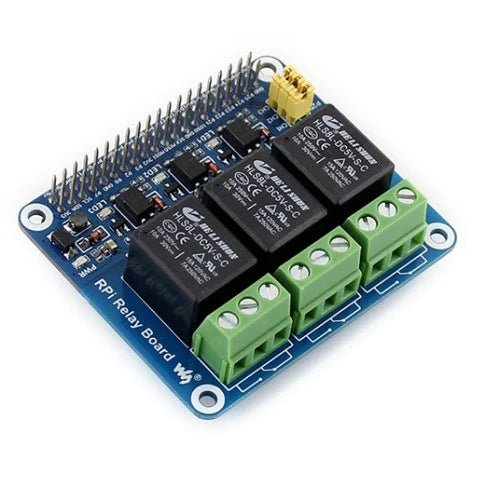
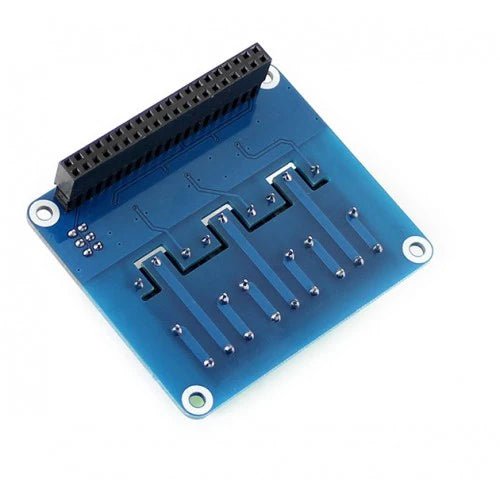


Relay Board For Raspberry Pi 4/3/2/Zero
Original price was: ₹ 1,499.00.₹ 999.00Current price is: ₹ 999.00.
| Weight | 0.15 kg |
|---|
5 in stock
Introduction
Raspberry Pi Expansion Board, Power Relay.
| More |
Interface description
- Correspondence between relay channel and RPi Pin
| Channel No. | RPi Pin No. | wiringPi | BCM | Descriptions |
|---|---|---|---|---|
| CH1 | 37 | P25 | 26 | Channel 1 |
| CH2 | 38 | P28 | 20 | Channel 2 |
| CH3 | 40 | P29 | 21 | Channel 3 |
Notices: The labels on the PCB are corresponding to the wiringPi code.
If you use cable to wire the board instead of directly attaching the pin heard, you need to connect the 5V, 3.3V and GND for normally powering.
- Relay_JMP (6P jumper) usage:
Relay_JMP is the relay control pin selecting jumper. When this jumper is connected, the relay can be controlled by the Raspberry Pi.
- Relay screw terminal description:
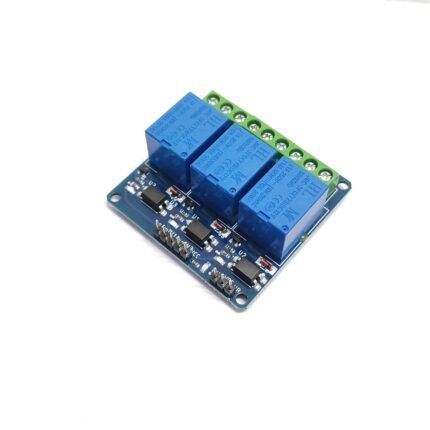
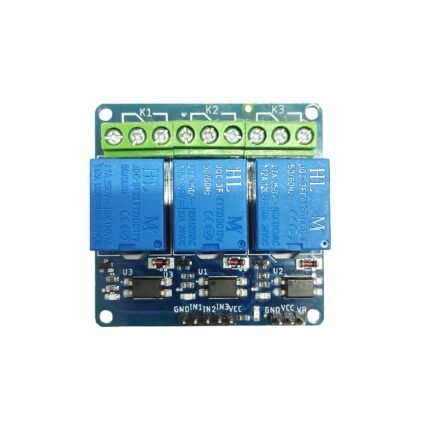
This board integrates three screw terminals, and each has three pins for connecting external circuits.
All the terminals are low active. When the Raspberry Pi outputs a Low Level from its IO, the LED related to the corresponding channel lights up. At the same time, the relay NO (normally open contacts) closes, and the NC (normally closed contacts) opens, so as to change the ON/OFF status of the external circuit.
(PS: Remember to connect the jumper Relay_JMP!)
Before the relay action: |
After the relay action: |
Working with Raspberry Pi
BCM2835
BCM2835
#Open the Raspberry Pi terminal and run the following command
wget http://www.airspayce.com/mikem/bcm2835/bcm2835-1.71.tar.gz
tar zxvf bcm2835-1.71.tar.gz
cd bcm2835-1.71/
sudo . /configure && sudo make && sudo make check && sudo make install
# For more information, please refer to the official website: http://www.airspayce.com/mikem/bcm2835/
wiringPi
#Open the Raspberry Pi terminal and run the following command
cd
sudo apt-get install wiringpi
#For Raspberry Pi systems after May 2019 (earlier than that can be executed without), an upgrade may be required:
wget https://project-downloads.drogon.net/wiringpi-latest.deb
sudo dpkg -i wiringpi-latest.deb
gpio -v
# Run gpio -v and version 2.52 will appear, if it doesn't it means there was an installation error

# Bullseye branch system using the following command:
git clone https://github.com/WiringPi/WiringPi
cd WiringPi
. /build
gpio -v
# Run gpio -v and version 2.70 will appear, if it doesn't it means there was an installation error
- Install the Python function library.
sudo apt-get update
sudo apt-get install python-pip
sudo apt-get install python-dev
sudo pip install RPi.GPIO
Test demo
Execute the following commands in the terminal, download the demo and extract it to the specified directory.
wget https://files.waveshare.com/upload/0/0c/RPi_Relay_Board.zip
unzip -o RPi_Relay_Board.zip -d ./RPi_Relay_Board
sudo chmod 777 -R RPi_Relay_Board
cd RPi_Relay_Board
Shell demo
Enter the Linux terminal and execute the following commands in the terminal:
cd shell
sudo ./Relay.sh CH1 ON
sudo ./Relay.sh CH2 ON
sudo ./Relay.sh CH3 OFF
Expected Result: The LED for relay channel 1 is lighted up and the relay is audible. The last two parameters in the command can be changed. For example, run the above commands to turn on relay 2 and turn off relay 3.
Bcm2835 Demo
Enter the Linux terminal and execute the following commands in the terminal:
cd bcm2835
make
sudo ./Relay_Module
Expected result: You can see the 3 LEDs light up in sequence and the relay switches back and forth between NC and NO contacts in sequence. At the same time, the terminal will display which contact the relay is currently in.
wiringPi Demo
Enter the Linux terminal and execute the following commands in the terminal:
cd wiringPi
make
sudo ./Relay_Module
Expected result: You can see the 3 LEDs light up in sequence and the relay switches back and forth between NC and NO contacts in sequence. At the same time, the terminal will display which contact the relay is currently in.
Python Demo
Enter the Linux terminal and execute the following commands in the terminal:
cd python
sudo python Relay_Module.py
Expected result: You can see the 3 LEDs light up in sequence and the relay switches back and forth between NC and NO contacts in sequence. At the same time, the terminal will display which contact the relay is currently in.
Web Control
The web page control of this demo is based on the python web framework to control the relay.
Enter the Linux terminal and execute the following commands in the terminal:
sudo apt-get install python-bottle
cd python-bottle
sudo python main.py
Enter the Raspberry Pi IP address in the address bar of Google Chrome (other browsers may be not compatible), port number 8080.

Working with RDK X3
Install Library File
sudo apt update
sudo pip3 install bottle
Download and Unzip the Sample Demo to the Specified Directory
sudo apt-get install p7zip
wget https://files.waveshare.com/upload/0/0c/RPi_Relay_Board.zip
unzip -o RPi_Relay_Board.zip -d ./RPi_Relay_Board
sudo chmod 777 -R RPi_Relay_Board
cd RPi_Relay_Board/Sunrise_X3
Run the Demo
Python
cd python
sudo python3 Relay_Module.py
Expected result: You can see the 3 LEDs lighting up in sequence and the relay switching back and forth between normally open and normally closed contacts in turn. The terminal also shows which contact the relay is currently on.
Webpage Control
The webpage control of this demo is to control the relay based on python Web.
cd python-bottle
sudo python3 main.py
Enter the Raspberry Pi IP address in the address bar of Google Chrome (other browsers may not be compatible), port number 8080.
Working With VisionFive2
Download and Unzip the Example demo to the Specified Directory
apt-get install unzip
wget https://files.waveshare.com/upload/0/0c/RPi_Relay_Board.zip
unzip -o RPi_Relay_Board.zip -d ./RPi_Relay_Board
cd RPi_Relay_Board/VisionFive2/
Use with Shell
chmod -R 777 shell
cd shell/
./Relay.sh CH1 ON
./Relay.sh CH2 ON
./Relay.sh CH3 OFF
Expected result: You can see the 3 LEDs lighting up in sequence and the relay switching back and forth between normally open and normally closed contacts in sequence. The terminal will also show which contact the relay is currently on. After using the above command, using the python routine will cause the pins to be unresponsive, so you can either restart VisionFive2 or use the clear.sh script.
./clear.sh
Use with Python
Install Library File
apt-get install pip
pip install VisionFive.gpio
Enter the Directory and Run the Demo
cd python
sudo python3 Relay_Module.py
Expected result: You can see the 3 LEDs lighting up in sequence and the relay switching back and forth between normally open and normally closed contacts in sequence. The terminal will also show which contact the relay is currently on.
Webpage Control
The webpage control of this demo is to control the relay based on the python WEB framework.
Install the Corresponding Library File
apt-get install pip
pip install VisionFive.gpio
apt-get install python3-bottle
Enter the Directory and Run the Demo
cd python-bottle/
python3 main.py
Enter the Raspberry Pi IP address in the address bar of Google Chrome (other browsers may not be compatible), port number 8080.
Resources
3D Drawing
FAQ







Reviews
There are no reviews yet.